Play
Dash, Swing, platformer movement, Tower levels, and new progression systems.
Quick answer
Short answer: Update 2.2 added the main level Dash, the Swing game mode, platformer-style movement, new Tower levels, Moons, new shops and resources, and a much larger editor toolset. It is better understood as a new platform for playing and creating levels than as a single patch note.
The update also created more version-sensitive search questions. “Geometry Dash 2.2” can mean the release date, the new player modes, a particular editor trigger, the music library, or a later minor build. This page keeps those intents together only where the source and reader need overlap; a specific level, song, or code still has its own owner page.
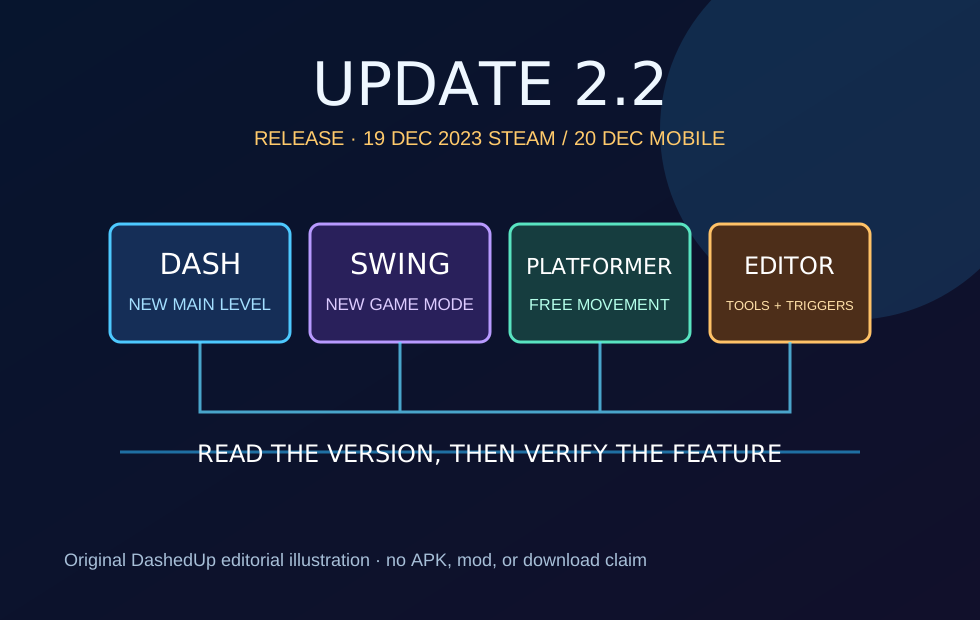
Visual note: the hero is an original DashedUp editorial diagram, not an official RobTop screenshot. Checked 2026-09-04.
Dash, Swing, platformer movement, Tower levels, and new progression systems.
Camera, shader, particle, keyframe, SFX, music, and trigger workflows.
Release platform, minor version, source date, and whether a claim belongs to Lite or full game.
Release and scope
The maintained update reference records 19 December 2023 for Steam and 20 December 2023 for Android and iOS. RobTop Games' launch video describes the update as available on the App Store, Google Play, and Steam. Those are release milestones, not a promise that every store, region, or later minor build shows identical behavior.
For a useful page, the version label belongs beside the fact. A screenshot from a 2.2 editor build, a 2.206 song table, and a Lite client are not interchangeable evidence. When this page says “2.2,” it means the major update family; when a behavior could change, it points you to the current editor guide or installed client.
| Platform | Recorded major release | How to verify today |
|---|---|---|
| Steam | 19 December 2023 | Check the Steam client/news record and installed build |
| Android | 20 December 2023 | Check the Play Store/client version available to your account |
| iOS | 20 December 2023 | Check the App Store/client version and device compatibility |
| Lite / spin-offs | Separate release and feature boundaries | Do not inherit full-game claims without a product-specific source |
Player features
The launch feature list is broad, but the player-facing core is easy to map: Dash is the new headline main level; Swing adds a new form of movement; platformer levels allow free movement rather than the familiar fixed forward flow; and The Tower supplies a new structure with four platformer levels in the update reference.
Other additions change how players collect and organize content. Moons, new shards, new shops, additional chests, Lists, and more Gauntlets add progression surfaces around the levels. They are not all the same kind of feature, so a page that calls every bullet a “game mode” is flattening the update and making answer extraction less precise.
| Feature | Player meaning | Evidence role | Intent |
|---|---|---|---|
| Dash | New main level | Official 2.2 trailer and update reference | Level content |
| Swing | New game mode | Official 2.2 trailer and update reference | Gameplay |
| Platformer | Free-movement level type | Official 2.2 trailer and editor guide context | Gameplay |
| The Tower | Four platformer levels in the new tower structure | Update 2.2 reference | Level set |
| Moons | New collectible named in the launch feature list | Official 2.2 trailer | Collectible |
Reader shortcut: if your question is about a particular level or level ID, jump to the relevant owner page instead of treating this update guide as a level database.
Editor changes
RobTop Games' Geometry Dash Editor Guide describes an editor large enough to need its own manual. The launch feature list names camera controls, shader effects, a particle editor, a keyframe and auto-build system, gradient/area/rotate gameplay/scale/random triggers, music and SFX libraries, more art, animations, and editor improvements such as scaling, layer locking, color hex inputs, and trigger precision.
These are tools, not a checklist to paste into every level article. A guide about a specific trigger should use the editor manual and a version label; a page about a custom song should use the music reference and its own source. The 2.2 page owns the update-level relationship and points outward when a reader needs a task-level answer.
Editor
New music and sound-effect tools for levels
Source role: Official 2.2 trailer and RobTop editor guide.
Editor
Expanded visual and sequencing controls
Source role: Official 2.2 trailer and editor guide.
Progression
New ways to organize levels and earn/use resources
Source role: Official 2.2 trailer and update reference.
Primary manual
Use the official guide for controls and editor scope rather than copying an undated tutorial.
Related reference
Separate official songs, Newgrounds audio IDs, and Music Library entries.
Creator tool
Create an original system-font title graphic without downloading or redistributing a font file.
Creator tool
Turn a level theme and gameplay cue into names you can compare and remix.
Learning path
Turn the official manual into a small graybox, readability, and trigger-learning sequence.
Symptom guide
Separate lag, crashes, sound, display, and editor-object failures before changing files.
Account guide
Use the official path for login, activation, cloud-save, and transfer problems.
Version check
Decide whether you need the release date, a player feature, an editor task, a level, or a song. One page should not pretend to own all five.
Steam, Android, iOS, Lite, and spin-offs can have different availability or timing. Put the platform beside the claim.
Use RobTop's launch material for the feature list and the official editor guide for control-level explanations.
Minor versions and store rollouts can change behavior. Record the build and date in your notes or update policy.
Send level-ID questions to the level reference, music questions to the music reference, and secret-room questions to the Vault Codes guide.
Boundaries
“Geometry Dash 2.2” is not an invitation to publish an APK, cracked PC build, noclip hack, or unofficial “full version” download. Those pages have a different intent and a different risk profile, and they are not the owner of this route. DashedUp's page explains the update and sends players to legitimate product sources or an installed client.
It also should not promise that a browser iframe is the official 2.2 game. Our playable owner remains Geometry Dash Lite; this page is a reference guide. Keeping the game surface and the update reference separate avoids both keyword cannibalization and a misleading product claim.
Questions players ask
Geometry Dash 2.2 is the major update that introduced Dash, the Swing game mode, platformer-style levels, new collectibles, expanded editor tools, and additional progression systems.
The version reference records a Steam release on 19 December 2023 and Android/iOS releases on 20 December 2023. Store rollouts can still differ by platform or region, so check the installed client rather than relying on an old article date.
Swing is a new game mode introduced with 2.2. This page names the mode and its owner without pretending that a static paragraph can replace an in-game control explanation or a current tutorial.
Yes. The update introduced platformer levels with unrestricted movement and a Tower set. The exact experience depends on the level and the current build; it is not the same input model as a traditional auto-scrolling main level.
The official launch feature list names camera controls, shader effects, a particle editor, a keyframe and auto-build system, new triggers, music/SFX libraries, and many editor improvements. RobTop's editor guide is the deeper source for how controls work.
No. DashedUp's 2.2 page is a reference guide. It does not embed the official paid game, host a browser recreation, distribute APKs, or promise that an unofficial copy contains the same update.
No assumption is safe. Lite and spin-off builds have their own release and feature boundaries. Use the specific product's store/client information and do not merge a full-game 2.2 feature list into a Lite claim without a source.
Record the exact version shown by the client or editor, plus the checked date. Minor updates can alter editor behavior, trigger details, or the availability of a secret, so a tutorial without a version label can age silently.
Start with RobTop Games' Geometry Dash Editor Guide, then use a current in-game example. The guide is a primary source for the editor's controls and scope; community tutorials are useful for demonstrations but should not replace it.
Evidence trail
The release dates and feature boundaries were checked on 2026-09-04. The launch feature list comes from RobTop Games' official 2.2 trailer description; editor details come from RobTop Games' Geometry Dash Editor Guide; update chronology and platform dates are cross-checked against the Official Geometry Dash Wiki update reference. Because minor builds continue to change, this page displays a checked date and is indexable after rendered QA and source review.
Checked: 2026-09-04 UTC/Australia-Sydney work session · Research state: index,follow · sitemap entry enabled after rendered QA.
Play next
Open a separate browser game to practise related movement. This recommendation does not claim that the exact level in this article is included.
Browse games